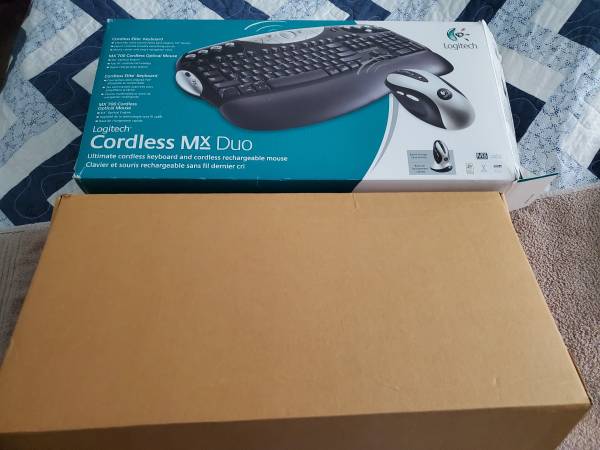
Logitech Cordless MX Duo Mouse and Keyboard (used but like new) - $15 (Lawrence)
‹image 1 of 12›
QR Code Link to This Post
The MX 700 Duo is one of the greatest cordless mice and keyboard combos ever made. I currently have 3 sets in active use (Windows XP, Win 10, and Win 11). I've been using this particular set with my Windows 11 laptop that I'm using to post this ad. I bought this set way back when, used it with various computers I built, and have stored it in the original box for many years until I recently got a new laptop. Both mouse and keyboard are in excellent condition with no flaws. Since it's older hardware, you have the option of PS/2 adapters or USB only on both desktops and laptops. It should work with Windows 95 or later Microsoft operating systems. Macs, too?
Windows 10 and 11 have a generic driver for this hardware and will recognize it without fuss, and that's what I use. The combo is old enough not to be actively supported by Logitech anymore, but the most recent SetPoint legacy driver is the one to get and install if you want to program/re-program all 8 mouse buttons and all keyboard functions beyond the generic support (https://support.logi.com/hc/en-sg/articles/360025141274-SetPoint). In 20+ years of usage, I've never felt the need to do that.
The battery and keyboard each uses 2 AA batteries. The mouse originally came with 2 NiMH (Nickel Metal Hydride) rechargeable batteries, so if you have any of those they will recharge whenever the mouse sits on the cradle. (I've also used DuraCell and Energizer NiMH battery chargers without problems.)
Years ago, I discovered that a full charge on _new_ rechargeable batteries for the MX 700 mouse lasts about a week before needing to be placed back on the cradle; most people (including me) will simply put it there for charging overnight. I still have several of the original NiMH batteries in place that still work but are fading. Batteries are not included in the sale here.
As for the MX 700 keyboard, it came originally with non-rechargeable batteries, but one can use plain alkaline batteries or rechargeable NiMH without problems. (Batteries do not charge in the keyboard; only in the mouse or third-party charger.) Not sure about Li-Ion or any newer battery types. In my experience, 2 new alkaline batteries will last about a year in the keyboard before needing to be replaced.
Note: the charging cradle is also the wireless controller and is powered by an AC adapter, so you'll need an available outlet; also, the AC adapter has one cable that plugs into the back of the USB connector. Yes, you still have wires..... The mouse and keyboard are technically "cordless," but the charging cradle and USB connector aren't. Not a problem for me. The mouse and keyboard should work fine within 6 feet of the cradle (maybe up to 10 feet?). The closer the better; RF interference from other electronic devices (e.g., monitors) is possible, so experiment for best placement.
Lots of excellent reviews from that period! Good gaming mouse! Feels great! Quiet keyboard! Sculpted keys! Etc.
https://www.abebooks.com/servlet/BookDetailsPL?bi=32310403607&dest=USA&ref_=ps_ggl_ show contact info
&cm_mmc=ggl-_-COM_Shopp_Rare-_-product_id=bi%3A%2032310403607-_-keyword=&gad_source=1&gad_campaignid=17181841339&gbraid=0AAAAAD3Y6gsNps75B9Nsbx73ZoRIGgKXO&gclid=EAIaIQobChMIxeujhZbBlQMVNR6tBh012jRJEAQYBCABEgLUpfD_BwE
Please note: I use CL mail relay for all communication.